


Trusted By
What Is Multi-Angle Virtual Staging?
Multi-angle virtual staging is AI virtual staging that furnishes several photos of the same room together, so every photo shows the same furniture in the same place. It is also called multi-view or consistent virtual staging.
Standard AI staging tools work one photo at a time. Stage a living room from two angles and you can get two different sofas, two different rugs and a listing that looks wrong the moment a buyer swipes to the next photo. Edensign first maps the room — walls, windows, floor and where each photo was taken — then places each piece of furniture once and renders it into every view from its own perspective.
Why single-photo staging breaks a listing
Buyers never look at one photo. They scroll the whole set, compare rooms and piece the layout together in their head. When the furniture changes between photos, something feels off, even if they can't say what. Consistent staging keeps the story straight from the first photo to the last.
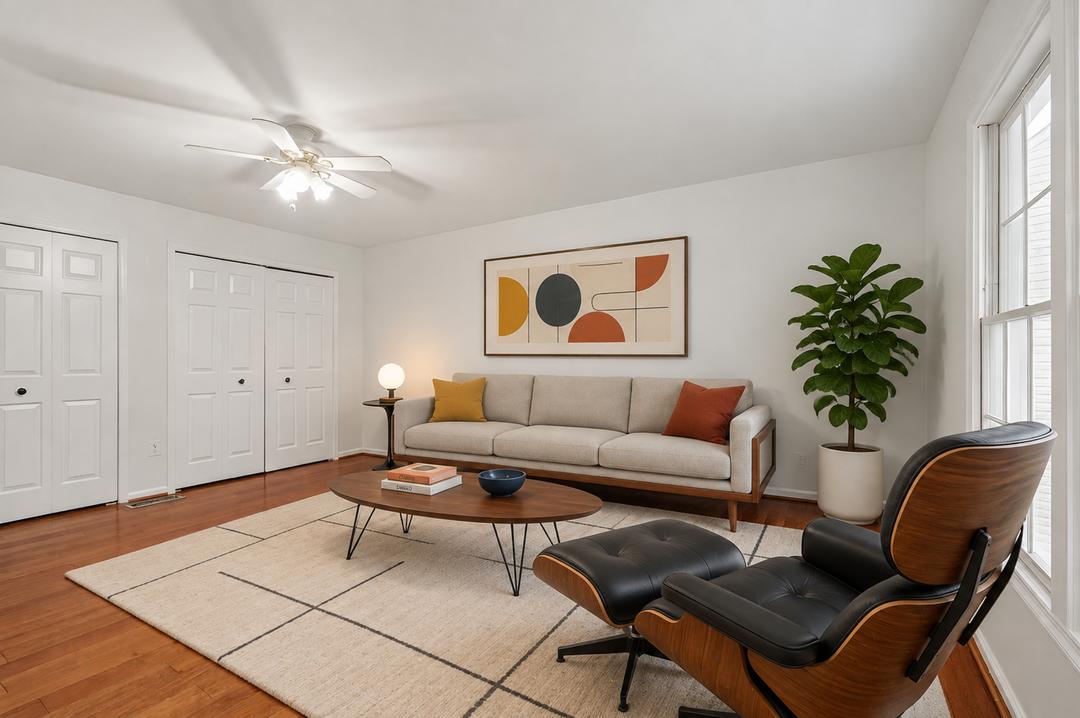 Angle 1
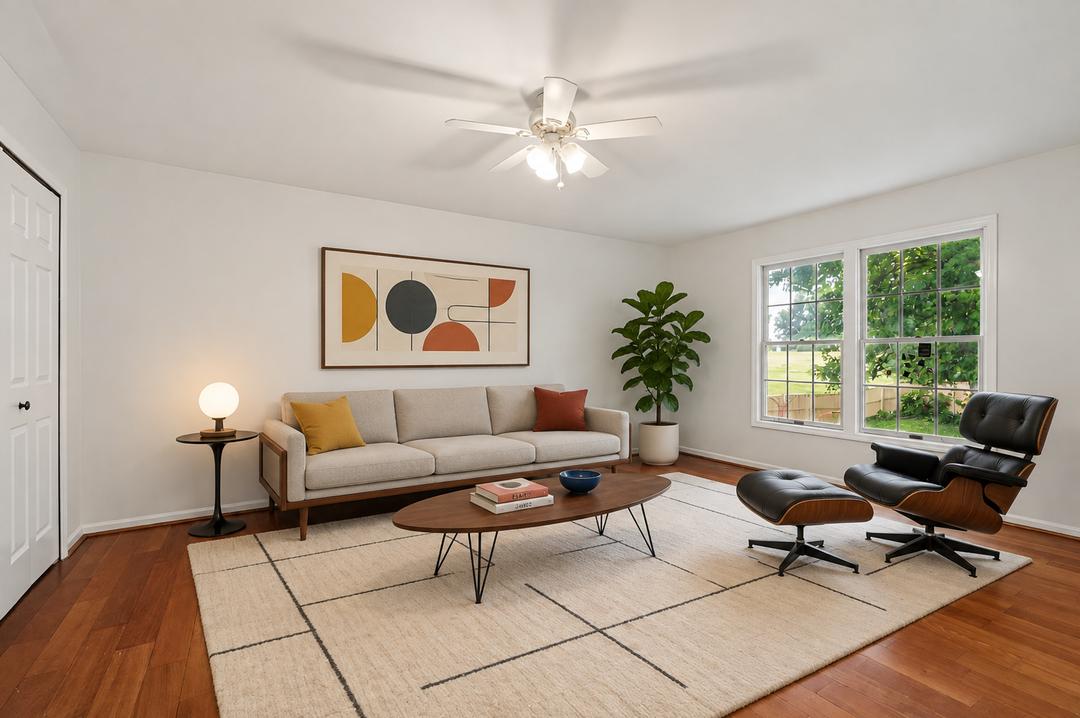 Angle 2
Why Agents Choose Multi-Angle Virtual Staging
Staging only works if buyers believe it. Multi-angle staging makes every photo in the set agree with the others.
One Room, One Story
The same sofa, rug and art in every photo, in the same spot. Buyers read the room as one real space instead of a set of unrelated pictures.
Buyers Trust What They See
When every angle agrees, the photos match what buyers find at the showing. Fewer surprises at the door, more confident offers.
Results on Screen in Seconds
About 15 seconds per photo, with the full set of angles on your screen in under a minute. No email, no 24–48 hour wait.
The Structure Stays Untouched
Edensign tells permanent elements from furniture, so walls, windows, floors and ceiling lines stay exactly as photographed. Staged, not altered.
A Fraction of Physical Staging
Physical staging runs $2,000–$5,000 per home. Multi-angle staging starts at $0.78 per photo, with unlimited revisions.
Every Style, Side by Side
Try modern, transitional, Scandinavian or mid-century on the same room and compare. Show investors one look and families another.
Virtual Staging Gallery
Multi-Angle Staging Before & After


How Multi-Angle Virtual Staging Works
- 1
Upload 2–4 photos of the same room. Listing photos from your photographer or shots from your phone both work. JPG, PNG, WebP, AVIF and HEIC are supported.
- 2
Pick the room type and a style. Choose from living room, bedroom, kitchen, dining room and more, then pick the design style that fits your buyer.
- 3
Edensign maps the room and stages every angle. The AI rebuilds the room's layout and each camera position, places the furniture once and renders it into every photo.
- 4
Review, refine and download. Regenerate for a different layout, swap a single piece with furniture editing, and download full-resolution, MLS-ready photos with no watermark.
How to Shoot a Room for Multi-Angle Staging
- Shoot from two or three corners so the photos share part of the same floor and walls.
- Keep the camera at about chest height and level, the same way for every shot.
- Turn on the same lights for every angle so the staged furniture is lit the same way.
- Leave windows and doorways in frame. They help the AI place each photo in the room.
- Occupied room? Run decluttering first, then stage the empty result.
Multi-Angle Staging for Every Room
Buyers judge every room by a different question. Is the living room big enough? Does a king bed fit? Where do we eat? Multi-angle staging answers each one the same way from every photo, so the answer holds up as buyers swipe through the set.
The rooms agents stage most often
Share of sellers' agents who stage each room. NAR 2025 Profile of Home Staging.
Multi-angle staging works in every room buyers scroll through: living rooms, primary bedrooms, kitchens, dining rooms, open-concept living and dining spaces, studio apartments, kids' rooms and nurseries, home offices, and balconies and patios. Each room is staged once and shown with the same furniture from every angle you upload.
Multi-Angle vs. Single-Photo vs. Traditional Staging
Four ways to furnish an empty listing, compared on what matters to a photo set.
| Feature | Edensign Multi-Angle | Single-Photo AI Staging | Virtual Staging Service | Physical Staging |
|---|---|---|---|---|
| Same furniture in every angle | Yes, automatically | No, each photo staged separately | Possible, with manual work | Yes |
| Turnaround | Seconds, on screen | Seconds to hours | 1–2 days | Weeks to schedule |
| Cost | From $0.78 per photo | Per photo | About $16–$35 per image | $2,000–$5,000 per home |
| Revisions | Unlimited, instant | Varies | Extra time, often extra cost | A new delivery |
| Walls and windows preserved | Yes | Varies | Yes | Yes |
| Try several styles | Yes, side by side | Yes | Extra cost | One look per listing |
“One image might look great, but the furniture would completely change in the next angle.”
Who Uses Multi-Angle Virtual Staging
Listing Agents
Stage a vacant listing yourself the same day the photos come back. Show sellers two or three styles before you go live, and publish a full set where every angle matches.
Edensign for Listing Agents →Real Estate Photographers
Add staging to your shoot package and deliver a consistent set across every angle you captured. No watermark, and you can resell the staged images to your clients.
Edensign for Real Estate Photographers →Brokers and Teams
One staging tool for every agent, with the same quality and the same style rules across the team, and a single invoice.
Edensign for Brokers and Teams →Brokerages
Bring staging in-house across offices. Agents create variations for different buyer profiles without waiting on outside vendors.
Edensign for Brokerages →Property Managers and Rentals
Renters compare galleries side by side. A furnished, consistent set helps an empty unit stand out and shows what fits before anyone books a tour.
Edensign for Property Managers and Rentals →Listing Platforms
Offer consistent multi-angle staging inside your own listing flow through the Edensign API.
Edensign for Listing Platforms →Next step for your listing

Testimonials
Real Results From Real Estate
Professionals
The multiview feature is pure sophistication. Instead of one boring shot, I showcase penthouses from multiple angles with consistent AI staging. Clients feel like they've toured the property virtually. It's incredibly impressive!
Amanda Foster
Luxury Real Estate Broker · Boston
Multiview angles make my listings stand out on every platform. Buyers see the full spatial flow before visiting. The professional presentation quality rivals million-dollar photoshoots but takes minutes. Absolutely worth every penny!
Kenji Yamamoto
Commercial Real Estate Agent · Los Angeles
Game-changer for pre-sales. We stage condos in modern and industrial styles before construction finishes. Buyers love seeing furnished spaces across bedroom, kitchen, and living areas. Cuts our staging costs by thousands per unit!
Raj Patel
Property Developer · Austin
Pricing
Try Multi-Angle Virtual Staging Free
Your first 2 rooms are on us. From $0.78/photo after that.
Auto-renews until canceled. Cancel anytime in account settings. Refund Policy
Multi-Angle Virtual Staging FAQ
It is AI virtual staging that furnishes several photos of the same room together, so every angle shows the same furniture in the same place. It is also called multi-view virtual staging.
Upload 2–4 photos of the same room. For a single photo, use standard virtual staging.
Shoot from two or three corners so the photos share some of the same floor and walls, and keep the lights the same in every shot.
About 15 seconds per photo. A full set of angles is usually on your screen in under a minute.
Living rooms, bedrooms, kitchens, dining rooms, open-concept living and dining spaces, studios, kids' rooms and nurseries, home offices, balconies and patios.
Yes. Most MLSs allow virtually staged photos when they are clearly disclosed. Keep the original photos available and label staged images the way your MLS asks.
No. Edensign only adds furniture and decor. Permanent features stay exactly as photographed.
Yes. Regenerate the room in another style as often as you like, or swap one piece with furniture editing.
No. Phone photos work. Well-lit, level photos give the best results.
Run decluttering first to clear the room, then stage the empty result across every angle.
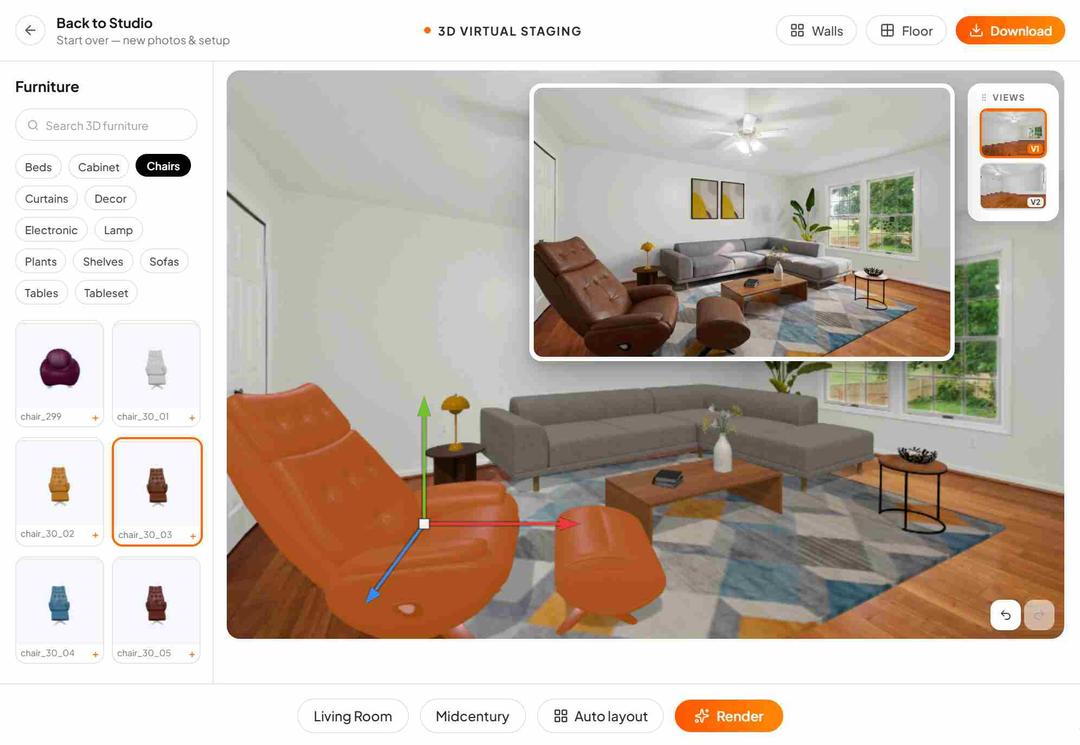
Multi-Angle Staging is fully automatic and the fastest way to stage a room from several photos. 3D Multi-Angle Staging places 3D furniture models you can move, rotate and resize, and every view updates with you.
Your first 2 rooms are free, with no credit card. After that, plans start at $20 a month billed yearly, and the per-photo price goes down to $0.78 on larger plans.
Yes. Every image comes without a watermark, is stored in your account and can be used anywhere: MLS, social media and print.