landing page background
For Redfin® listings

AI virtual staging for Redfin listings that earns the Redfin Hot Home badge.

Redfin's algorithm rewards engagement on every Redfin listing — saves, tours scheduled, click-through. Better Redfin photos move all three metrics. Edensign stages the full Redfin set in one pass, at the resolution Redfin's grid expects.

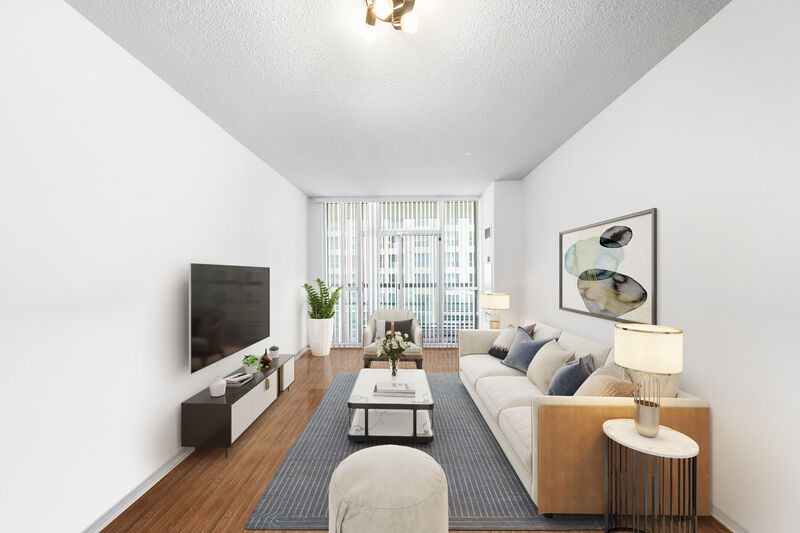
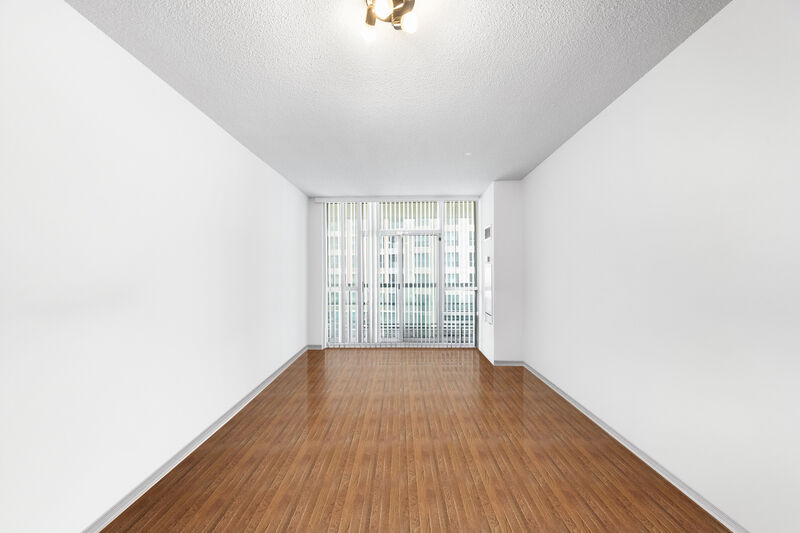
Hot Home staged hero · 15s (before)
Hot Home staged hero · 15s
Before
After
Upload Image
Drag & drop your photo or click to browse
Supports JPG, PNG, WebP, AVIF, HEIC
No credit card required, your first 2 rooms are free.

Used by Redfin Premier and Partner agents in Seattle, SF, LA, Boston, DC, and more

Atelier RealtyNorth Studio GroupEditions HomesMarbel EstatesHayes & CoObject Realty

Independent service. Not affiliated with or endorsed by Redfin Corporation.®

Trusted By

Why Redfin is different

Redfin is a tech-forward feed with an algorithm-driven surface.

The Hot Home badge changes everything

Redfin's Hot Home algorithm flags listings predicted to sell quickly — and Hot Homes get outsized buyer attention. Engagement signals (saves, tours, shares) feed the prediction. Better photos lift every signal that matters.

Hot Home flag = 3–5x normal listing views
Engagement-weighted ranking

Redfin re-sorts search results by activity — listings with high recent saves and tour-requests rise. The first 48 hours of photo performance set the trajectory for the entire listing. Stage before you list, not after.

First 48h decide listing trajectory

Hosted comparables view

Redfin shows your listing alongside comparable sales — photos sit side-by-side with sold prices. Inconsistent or vacant photos read poorly in comparison view; staged sets establish a coherent value story.

Comparables view is buyer education at scale

Workflow

Stage to MLS spec. Redfin picks up in hours.

  1. 01

    Upload your photos to Edensign.

    Photographer files, drone shots, restaged tenant photos — all input types supported.

  2. 02

    Stage the full set in one pass.

    Pick the hero, kitchen, primary, living, exterior. Multi-view consistency is Redfin's grid bar — every photo on the same register.

  3. 03

    Upload to your MLS — Redfin pulls within hours.

    Redfin re-indexes new MLS photos within 2–6 hours typically. Add the MLS-required "Virtually Staged" caption per your local rules.

Image specs

Redfin photo standards — and how Edensign matches.

Redfin renders the same MLS-feed photos into a sharper-than-average grid layout. These are the dimensions that actually keep your photos crisp on a Redfin tile.

  • Minimum dimensions
    Platform
    640 × 480 px enforced by MLS feeds Redfin ingests; below this looks compressed.
    Edensign
    FitsEdensign preserves photographer-native resolution — typically 3000–6000 px wide, far above the floor.
  • Recommended dimensions
    Platform
    1,920 × 1,280 px or higher for crisp Redfin grid tiles and full-screen detail-page viewing
    Edensign
    FitsDefault Edensign output meets this without resizing. The detail-page full-screen view stays sharp on 4K monitors.
  • Aspect ratio
    Platform
    Grid tile is roughly 3:2; detail hero is 16:9; comparable-view thumbnail is square.
    Edensign
    FitsStaging is composed around the center of the frame — survives all three crops without losing the focal vignette.
  • File format
    Platform
    JPEG only via MLS feeds. PNG or HEIC get re-encoded by your MLS.
    Edensign
    FitsJPEG export by default at quality 92. PNG available if your MLS accepts.
  • Max file size
    Platform
    Inherits MLS-feed limits — typically 10–20 MB per photo. Redfin re-renders to roughly 500 KB per tile.
    Edensign
    FitsEdensign typically exports 1–6 MB — under every MLS cap encountered.
  • Photos per listing
    Platform
    Redfin typically displays 25–40 photos depending on listing tier and market
    Edensign
    FitsStage the full set Redfin will display — per-photo pricing means a 40-photo set runs ≈ $31 at Professional tier.
  • Photo order
    Platform
    MLS-feed order, with first photo as the hero on every Redfin surface
    Edensign
    FitsOrder your MLS upload deliberately — Edensign keeps numbering consistent through the batch flow.

Reflects Redfin's grid and detail-page rendering as of 2026. Your local MLS may impose stricter limits — verify before publishing.

Display slots

Redfin surfaces you’re optimizing for.

Redfin renders listings into multiple algorithm-weighted surfaces. Edensign output has to perform on each one.

Hot Home lead card

A flame-badged tile at the top of the buyer feed for listings predicted to sell quickly. Photo quality and listing completeness both feed the prediction.

Edensign fitBright, contrasty hero photos lift the saves-per-impression metric that drives Hot Home — stage the hero with maximum visual punch.

Search grid tile

Default Redfin search view: a grid of 3:2 photo tiles with price, beds/baths, and a 'Recently sold' or 'New listing' label. Densest photo surface on any major platform.

Edensign fitComposition that reads at small sizes — strong focal vignette, no busy mid-tone areas that flatten at grid scale.

Comparables side-by-side

Redfin displays your active listing alongside recent comparable sales, photos shown together. Consistency vs. comps materially affects perceived value.

Edensign fitMatch the staging register of recent sold comps in your zip code — Edensign style library covers contemporary, transitional, and traditional.

"Schedule a Redfin tour" card

Hero photo appears in the tour-scheduling modal, again in the post-schedule confirmation. Buyers see this 2–3 times before stepping into the home.

Edensign fitHero stays consistent between feed and tour-scheduling surfaces — no disorientation between what they saw online and what they'll see in person.

Use cases

Where Redfin staging pays back fastest.

Five Redfin-typical listing profiles where Edensign output lifts engagement metrics.

01

Seattle / Bay Area Hot Home candidate

Hot market

First-48h engagement decides the trajectory. Stage to maximize saves-per-impression.

Before
After
02

Redfin Premier $1.5M+ listing

Premier

Premier-tier listings get extra grid prominence. Editorial-quality staging matches the buyer expectation.

Before
After
03

Vacant suburban single-family

Empty

Empty rooms read poorly in Redfin grid view. Stage living, kitchen, primary, and a bedroom.

Before
After
04

Listing competing against recent comps

Comp

Side-by-side comp view rewards photo consistency. Match the dominant staging register in the zip.

Before
After
05

Updated kitchen feature shot

Kitchen

Redfin search filters surface kitchen photos. Add furniture, declutter, refresh.

Before
After
06

Exterior day-to-dusk hero

Twilight

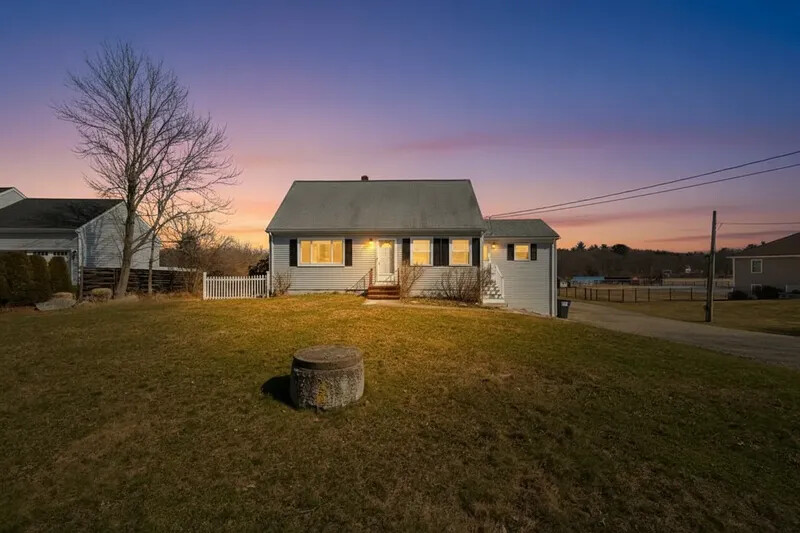
Dusk hero photos dominate the Redfin Hot Home grid — the highest-converting hero variant.

Before
After

Pricing for Redfin agents

Per-photo pricing matched to Redfin photo counts.

Most Redfin Partner and Premier agents sit on Professional ($0.77/photo). A 40-photo listing set runs about $31.

Starter

$1.33per photo

$20 USD / mo

180 photos / year · billed annually

Great for real estate agents testing virtual staging.

Pro

Most Popular
$0.90per photo

$45 USD / mo

600 photos / year · billed annually

Designed for active realtors and photographers with consistent listings.

Premium

$0.78per photo

$117 USD / mo

1800 photos / year · billed annually

Volume1800 photos/yr
150300500100020005000

Tailored for brokerages and real estate teams with high-volume needs.

What Redfin publishers ask before signing up

Yes. Redfin displays what the host MLS feeds it. Each MLS sets the disclosure rule — typically a 'Virtually Staged' label in the photo caption or listing remarks. Edensign output itself is policy-neutral; the disclosure is the agent's responsibility per local MLS rules.

Indirectly, yes. The Hot Home algorithm weights early engagement — saves, tours scheduled, click-through. Better photos lift all three. Staging won't make a bad listing a Hot Home, but a great staging set on a competitive listing has a measurable lift in first-48h engagement.

Redfin pulls MLS data more aggressively than most consumer platforms — 2–6 hours typically. If you re-stage and re-upload to MLS in the morning, the new photos are live on Redfin by mid-afternoon.

Redfin typically displays 25–40 photos depending on listing tier and market. Top-performing listings tend to sit at 30–40 — enough variety without padding. Edensign per-photo pricing makes the full set economical.

No. Any MLS-listed property surfaces on Redfin automatically through MLS ingestion. Redfin Premier and Partner programs are about who Redfin recommends buyers to — not about who can list. Edensign works the same for non-Redfin-affiliated agents.

Yes. Redfin re-renders for the grid (≈ 500 KB tiles) and detail page (sharper full-screen view). Edensign output at 3000–6000 px wide gives Redfin enough source resolution to render crisply at every breakpoint.

Yes. Team plans include centralized billing, agent invites, and per-agent usage reports. Useful for offices where Premier agents share a transaction coordinator who handles all uploads.

Stage for the other listing platforms too.

Pages tailored to each major listing surface and its photo rules.

Your Next Listing
Deserves a Better Vision

Start staging in seconds. No credit card. No design skills.

Drag & drop your listing photo here

Supports JPG, PNG, WebP, AVIF, HEIC

Contact Sales

Trademark notice. Edensign is an independent service. Redfin®, Hot Home®, Redfin Premier®, and Redfin Partner® are registered trademarks or service marks of Redfin Corporation. Edensign is not affiliated with, endorsed by, or sponsored by Redfin Corporation. All trademarks belong to their respective owners.