landing page background
For Apartments.com® listings

AI virtual staging for Apartments.com that earns the tour request, not just the scroll.

Apartments.com renters don't buy — they decide in a week whether to tour. The hero photo, the in-unit shots, and the amenity gallery have to do that work in a vacant unit between tenants. Edensign stages the empty unit in about 15 seconds per photo, at the resolution the Apartments.com player expects.

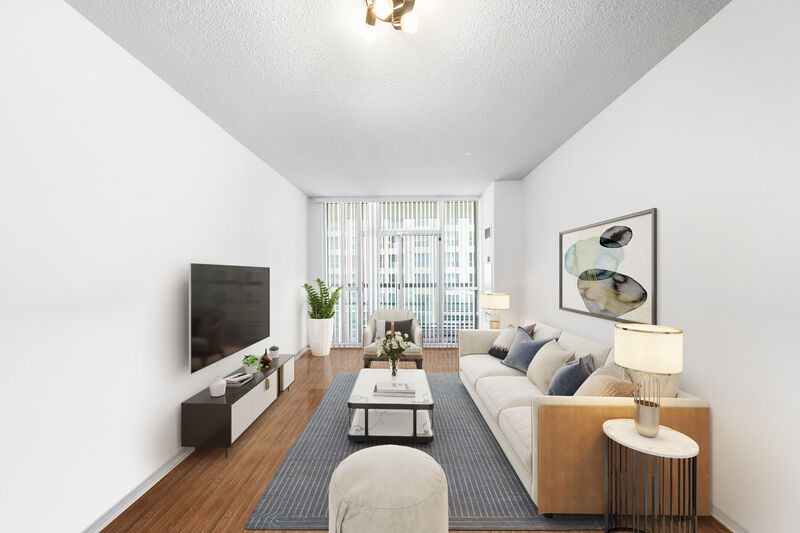
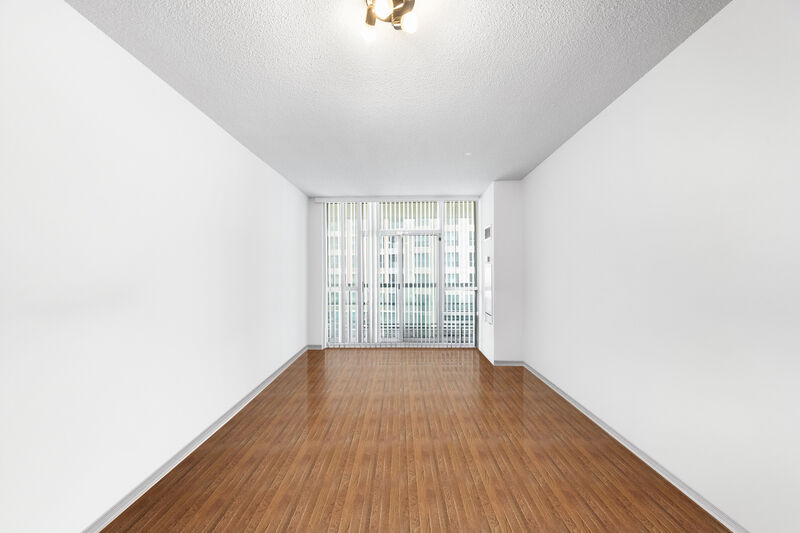
Vacant unit staged for Apartments.com · 15s (before)
Vacant unit staged for Apartments.com · 15s
Before
After
Upload Image
Drag & drop your photo or click to browse
Supports JPG, PNG, WebP, AVIF, HEIC
No credit card required, your first 2 rooms are free.

Used by property managers and leasing teams across LA, NYC, Atlanta, Dallas, Denver, and more

Atelier ResidentialNorth Property GroupEditions LivingMarbel CommunitiesHayes Property CoObject Residential

Independent service. Not affiliated with or endorsed by CoStar Group, Inc.®

Trusted By

Why Apartments.com is different

Apartments.com is rentals, not sales — the photo job changes.

Renters tour, not buy

Apartments.com decisions happen in days, not months. The hero earns a tour request — that's the only metric. Vacant units with empty rooms read as 'partial listing'; staged units read as 'move-in ready'. The lift is on the tour-request rate, not page time.

Decision window: 3–10 days
Same unit, every lease cycle

A multifamily unit re-leases every 12–18 months. Photograph the empty unit once, stage variations for each cycle — modern, cozy, professional, family — without re-shooting. Edensign output is per-photo, not per-unit-forever.

Reuse the empty-unit photo set indefinitely

CoStar rental-network syndication

Apartments.com is part of CoStar's rental portfolio (ForRent.com, ApartmentFinder, ApartmentHomeLiving, Doorsteps, Westside Rentals). One staged set syndicates across the network — your photos do work on five surfaces, not one.

Cross-listed across the CoStar rental network

Workflow

Stage between tenants. Re-stage every lease cycle.

  1. 01

    Shoot the unit empty, once.

    During the turn between tenants, shoot every room and every amenity space. Photographer or smartphone — Edensign accepts both, up to 20MB per photo.

  2. 02

    Stage in about 15 seconds per photo.

    Pick a style brief that matches the building positioning — modern, professional, family, cozy. Multi-view consistency keeps every unit angle on the same register.

  3. 03

    Upload to your Apartments.com dashboard.

    Drop the JPGs straight into the CoStar dashboard. Photos syndicate across the network within an hour. Re-stage and re-upload each lease cycle without re-shooting.

Image specs

Apartments.com photo requirements — and how Edensign matches them.

Apartments.com doesn't depend on an MLS feed — property managers upload directly via the CoStar dashboard. The specs are tighter and more predictable than the MLS-driven portals.

  • Minimum dimensions
    Platform
    800 × 600 px minimum via the CoStar upload tool; smaller uploads are rejected
    Edensign
    FitsOutput preserves the input resolution. Even smartphone photos stay well above the 800 px minimum.
  • Recommended dimensions
    Platform
    1,920 × 1,440 px ideal — Apartments.com renders the hero full-screen on the detail page
    Edensign
    FitsPhotographer files at 3000–6000 px wide pass through unchanged. Full-screen hero stays sharp on retina displays.
  • Aspect ratio
    Platform
    Detail-page hero is 16:9; gallery is 4:3; feed thumb is square. CoStar applies a smart-center crop
    Edensign
    FitsFurniture and styling placed centrally so the focal vignette survives square thumbs and 16:9 hero crops alike.
  • File format
    Platform
    JPEG (preferred) and PNG. HEIC accepted via the CoStar uploader.
    Edensign
    FitsJPEG export at quality 92 by default. PNG export available for floorplans and amenity diagrams.
  • Max file size
    Platform
    20 MB per photo via the CoStar dashboard uploader
    Edensign
    FitsTypical Edensign output is 1–6 MB at full photographer resolution. Always under the cap.
  • Photos per listing
    Platform
    Up to ~50 displayed on Diamond/Platinum tiers; Silver/Gold caps at ~25; basic listings ~12
    Edensign
    FitsPer-photo pricing scales with the tier — a 50-photo Diamond listing runs about $39 at Professional tier.
  • Photo order
    Platform
    Manager-controlled in the CoStar dashboard. First photo is the hero across feed, detail, search, and email
    Edensign
    FitsStage the hero first, then a representative living/dining, the primary bedroom, the kitchen, and the amenity space. Edensign's batch flow keeps the set numbered.

Reflects the Apartments.com CoStar dashboard as of 2026. Tier limits vary by market and contract — verify in your CoStar account.

Display slots

Apartments.com surfaces you’re actually optimizing for.

Apartments.com isn't a single search feed — it's the CoStar rental network spread across five sites. Your photo set has to land on each one without re-staging.

Search-feed listing card

Card view in the renter search feed: square hero, rent range, beds/baths, and a "Verified Listing" badge for paid tiers. Most renter sessions never leave this view.

Edensign fitBright, well-staged hero photos with centered focal vignettes read clearly at small card sizes — no muddy mid-tones, no over-busy compositions.

Detail-page hero & gallery

The full unit experience: large 16:9 hero, tap-through gallery, floorplan, amenity tabs, and rent rating. Renters spend 60–120 seconds here before requesting a tour.

Edensign fitConsistent style and color register across the unit shots and amenity shots — the gallery feels like one property, not a stitched collage.

Amenity-tab photo set

Apartments.com separates unit photos from amenity photos: pool, gym, lobby, coworking, dog run. Each tab needs at least one strong image to telegraph "premium building".

Edensign fitStage empty amenity spaces with furniture and warm lighting — pool loungers, gym props, lobby seating — to convey "lived-in", not "freshly poured".

CoStar network cross-listings

Your Apartments.com photos auto-syndicate to ForRent.com, ApartmentFinder, ApartmentHomeLiving, Doorsteps, and Westside Rentals — same files, different renter audiences.

Edensign fitStandard JPG output works on every CoStar rental surface. One staged set, five sites of inventory — no per-platform re-render.

Use cases

The rental listings that get the biggest lift on Apartments.com.

Six rental profiles where staging the empty unit pays back inside a single lease cycle.

01

Vacant unit between tenants

Vacant turn

The default Apartments.com use case. Stage the unit during the turn — photograph once, re-use for every future lease cycle.

Before
After
02

One floorplan, dozens of identical units

Floorplan repeat

Stage one model unit per floorplan. The same staged photo set works for every identical unit in the building — no per-unit re-shoot.

Before
After
03

Empty amenity room (gym, lobby, lounge)

Amenity space

Furnish the empty amenity tab — gym props, lobby seating, coworking desks — without scheduling a photoshoot.

Before
After
04

Furnished corporate / short-term unit

Furnished

Swap the existing furniture register to match the building's tier positioning — modern, executive, or family — without re-furnishing.

Before
After
05

Single-family build-to-rent home

SFR rental

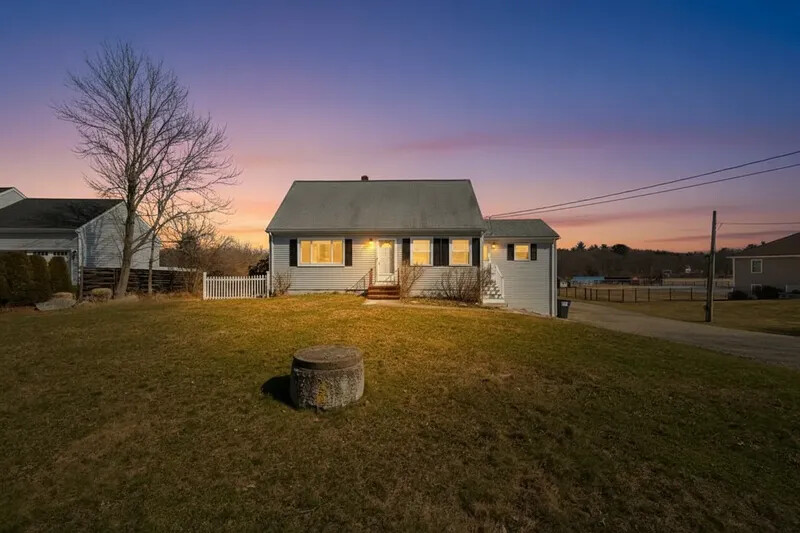
BTR portfolios list on Apartments.com alongside traditional multifamily. Stage the SFR like a home, not a unit — full living, dining, primary bedroom set.

Before
After
06

In-unit kitchen feature photo

Kitchen

Renters filter heavily on kitchen quality. Stage the counters, add styling, declutter dated appliances — same angle, modern register.

Before
After

Pricing for Apartments.com publishers

Per-photo pricing that fits a 30–50 photo rental listing.

Most property managers publishing to Apartments.com sit on Professional ($0.77/photo) — a full Diamond-tier photo bar with unit, amenity, and floorplan shots runs $30–$40 per unit's first stage.

Starter

$1.33per photo

$20 USD / mo

180 photos / year · billed annually

Great for real estate agents testing virtual staging.

Pro

Most Popular
$0.90per photo

$45 USD / mo

600 photos / year · billed annually

Designed for active realtors and photographers with consistent listings.

Premium

$0.78per photo

$117 USD / mo

1800 photos / year · billed annually

Volume1800 photos/yr
150300500100020005000

Tailored for brokerages and real estate teams with high-volume needs.

What rental publishers ask before signing up

Yes. Apartments.com accepts virtually staged photos. The CoStar best-practice guidance is to label staged photos as 'Virtually Staged' in the photo caption — same convention as MLS-driven portals. Edensign output itself is policy-neutral; the disclosure is the property manager's responsibility per local advertising rules.

The decision window is much shorter — renters decide in days, not months — and the goal is a tour request, not an offer. That favors simpler, more universally appealing staging registers (modern, neutral, broadly liveable) over aspirational editorial staging. Edensign style presets cover both registers; the rental brief is usually the safer end of the library.

Apartments.com is property-manager-driven, not MLS-driven. You upload directly via the CoStar dashboard (the same dashboard that controls your tier, rent ranges, and contact form). Photos syndicate across the CoStar rental network — ForRent.com, ApartmentFinder, ApartmentHomeLiving, Doorsteps, Westside Rentals — within an hour.

You don't need to re-shoot — the empty-unit source photos stay valid for years. You can re-stage the same source set with a fresh style brief each lease cycle (modern this year, cozy next year) to keep the listing visually fresh without scheduling another photographer.

Diamond and Platinum tiers display up to ~50 photos; Silver and Gold cap at ~25; basic listings show ~12. Top-converting rental listings sit near the tier ceiling — enough variety to cover the unit, the amenity spaces, the floorplan, and the building exterior. Edensign per-photo pricing makes the full set affordable.

Apartments.com, Homes.com, and LoopNet are all part of the CoStar Group portfolio but operate separate listing inventories — rentals, residential sales, and commercial. Staged rental photos don't auto-cross-list to Homes.com or LoopNet. Edensign exports standard JPGs that work on every CoStar surface if you publish to multiple ones.

Direct CoStar dashboard uploads typically reflect on Apartments.com within 30–60 minutes and across the rest of the rental network within a few hours. Edensign's 15-second render time means you can stage in the morning and have a fresh listing by lunchtime.

Stage for the other listing platforms too.

Pages tailored to each major listing surface and its photo rules.

Your Next Listing
Deserves a Better Vision

Start staging in seconds. No credit card. No design skills.

Drag & drop your listing photo here

Supports JPG, PNG, WebP, AVIF, HEIC

Contact Sales

Trademark notice. Edensign is an independent service. Apartments.com®, ForRent.com®, ApartmentFinder®, ApartmentHomeLiving®, Doorsteps®, Westside Rentals®, Homes.com®, and LoopNet® are registered trademarks of CoStar Group, Inc. or its affiliates. Edensign is not affiliated with, endorsed by, or sponsored by CoStar Group, Inc. All trademarks belong to their respective owners.