landing page background
For Homes.com® listings

AI virtual staging for Homes.com that wins the neighborhood-first scroll.

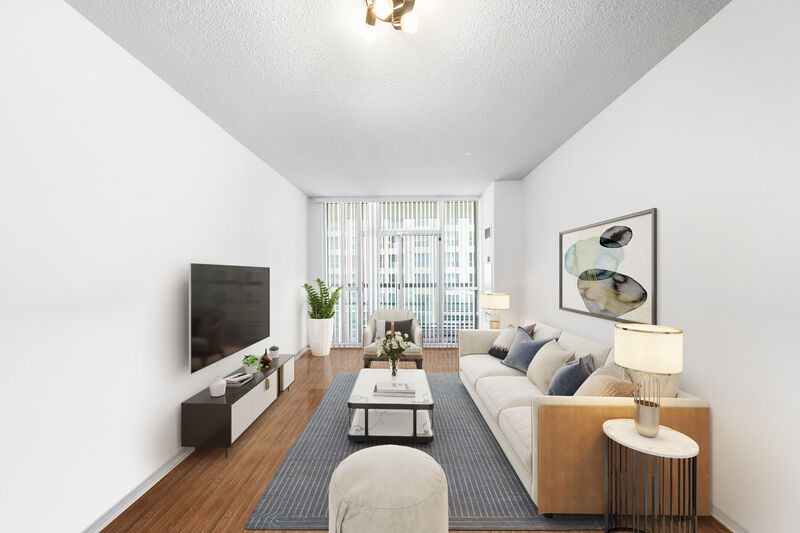
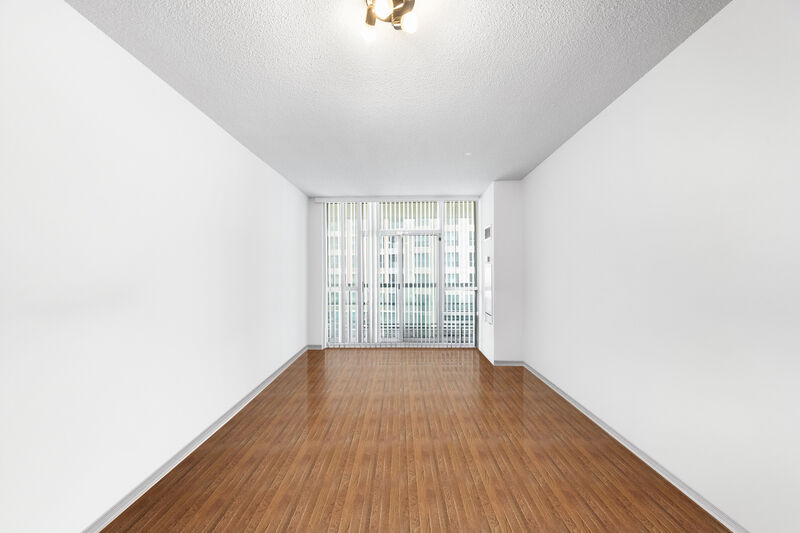
Homes.com leads with the neighborhood — school ratings, community profile, walk score — before the buyer ever taps your listing. When they do, the hero photo has to earn the next click. Edensign stages that hero, and the rest of your Homes.com carousel, at the CoStar player's native resolution in about 15 seconds per photo.

Hero photo staged for Homes.com · 15s (before)
Hero photo staged for Homes.com · 15s
之前
之后
上传图片
拖放照片到此处或点击上传
支持 JPG、PNG、WebP、AVIF、HEIC
无需信用卡,前两张房间照片免费。

Used by Homes.com publishers across Austin, Charlotte, Nashville, Phoenix, Denver, and more

Atelier RealtyNorth Studio GroupEditions HomesMarbel EstatesHayes & CoObject Realty

Independent service. Not affiliated with or endorsed by CoStar Group, Inc.®

值得信赖的品牌

Why Homes.com is different

Homes.com sells the neighborhood first — your photos sell the home.

Neighborhood-led discovery

Homes.com pages lead with a community profile — school ratings, walk score, lifestyle write-up — before the listing carousel loads. By the time buyers reach your photos, they've already committed to the area. The hero just has to confirm the home matches.

Community panel above the listing fold
Homes AI in 50+ languages

Homes.com's built-in AI assistant lets buyers ask conversational questions — school zoning, tax history, nearby amenities — in 50+ languages. International and ESL buyers convert here who bounce off other portals. Staged photos read across every language; vacant rooms don't.

Multilingual buyer audience

CoStar network reach

Homes.com is part of CoStar Group — same parent as Apartments.com and LoopNet. Your photos can live across the portfolio with a single staged set. Edensign exports standard JPGs that work on every CoStar surface.

Same files, three CoStar portals

Workflow

Stage once. Your MLS feeds Homes.com automatically.

  1. 01

    Upload your listing photos to Edensign.

    Photographer-delivered JPEGs, phone photos, or restage-over-tenant-furniture sources — all supported, up to 20MB per photo.

  2. 02

    Stage the full set in one pass.

    Pick hero, kitchen, primary bedroom, living, exterior. Multi-view consistency is the default so the carousel reads as one home across every angle.

  3. 03

    Push to your MLS — Homes.com picks up.

    Homes.com refreshes from MLS within 4–24 hours. For agent-claimed listings, you can also upload directly in your Homes.com Pro dashboard.

Image specs

Homes.com photo requirements — and how Edensign matches them.

Homes.com inherits image specs from the host MLS and re-encodes everything for the CoStar player. These are the constraints that actually bind once your photos land on the consumer site.

  • Minimum dimensions
    Platform
    640 × 480 px enforced by most MLS feeds; Homes.com re-renders smaller for thumbs
    Edensign
    FitsOutput preserves the photographer’s native resolution — typically 3000–6000 px wide, never the lower bound.
  • Recommended dimensions
    Platform
    1,920 px on the long edge for the hero; ≥ 1,536 px wide for carousel photos to stay sharp on retina laptops
    Edensign
    FitsPhotographer files stay at their native resolution after staging. Hero crops stay sharp on the CoStar player’s full-screen view.
  • Aspect ratio
    Platform
    Detail-page hero renders ~16:9; carousel is mixed (4:3 default); feed thumb is square
    Edensign
    FitsFurniture and styling placed toward the room center so the focal vignette survives both square thumbs and 16:9 hero crops.
  • File format
    Platform
    JPEG via MLS feeds; PNG and HEIC re-encoded by Homes.com
    Edensign
    FitsJPEG export by default at quality 92 — well under every MLS upload cap.
  • Max file size
    Platform
    MLS-feed dependent. Most MLSes cap at 10–20 MB per photo; Homes.com re-encodes smaller for the carousel
    Edensign
    FitsTypical Edensign output is 1–6 MB at full photographer resolution. Always under the cap.
  • Photos per listing
    Platform
    Up to ~50 displayed depending on the MLS feed contract; agent-claimed listings can add more via Homes.com Pro
    Edensign
    FitsPer-photo pricing scales to a full set — staging 40 photos costs $24–$40 depending on tier.
  • Photo order
    Platform
    Inherits MLS-feed order; first photo is the hero across feed, detail, and email digest
    Edensign
    FitsStage and order with intent in your MLS upload. Edensign's batch flow keeps the set numbered through export.

Reflects Homes.com behavior and the typical MLS feed contract as of 2026. Your local MLS may impose stricter limits — verify before publishing.

Display slots

Homes.com surfaces you’re actually optimizing for.

Homes.com renders into more contextual surfaces than the average portal — neighborhood pages, school pages, agent pages. Your photo set needs to land on each one without re-staging.

Neighborhood-page listing tile

Homes.com leads with the neighborhood — visitors browse a community page, then see your listing in the embedded tile grid. Square hero, price, beds/baths, days on Homes.com.

Edensign fitBright hero photos centered on the focal vignette read clearly at tile size, even sandwiched between neighborhood photos and school cards.

Detail-page hero & carousel

The main listing experience on the CoStar player: a large 16:9 hero with a tap-through carousel through the rest of the set. Buyers spend 60–120 seconds here.

Edensign fitConsistent color temperature, furniture register, and styling across the full set — the carousel feels intentional, not assembled from mismatched sources.

School-page nearby listings

Homes.com school pages show a "Nearby homes" rail of listings zoned to that school. The same hero photo appears here, in a horizontally scrollable rail.

Edensign fitStage the hero with school-shopping families in mind — family room, primary bedroom, exterior — the photos most likely to convert at this surface.

Homes AI conversation results

When a buyer asks Homes AI a question ("3-bed near a great elementary, walkable"), the AI returns listings with the hero photo. Multilingual surface, fast scroll.

Edensign fitHigh-contrast, well-staged hero photos earn the tap even at small AI-result-card sizes, across English and 50+ other languages.

Use cases

The listings that get the most lift on Homes.com.

Five property profiles where the neighborhood-first surface makes staged photos pay back the fastest.

01

Family home in a high-rated school zone

Family home

Homes.com school pages drive serious family-buyer traffic. Stage the family room, kitchen, and primary suite for school-shopping families.

Before
After
02

Listing in a featured Homes.com community

Community

When the neighborhood profile is the front door, the listing photos have to confirm the lifestyle the community page promised.

Before
After
03

International or ESL-buyer market

Multilingual buyer

Homes AI converts buyers in 50+ languages. Staged interiors read across every language; vacant rooms don't.

Before
After
04

Vacant suburban single-family

Vacant

The default Homes.com use case. Empty rooms read flat in the neighborhood tile grid — stage every key room.

Before
After
05

Exterior day-to-dusk hero

Twilight

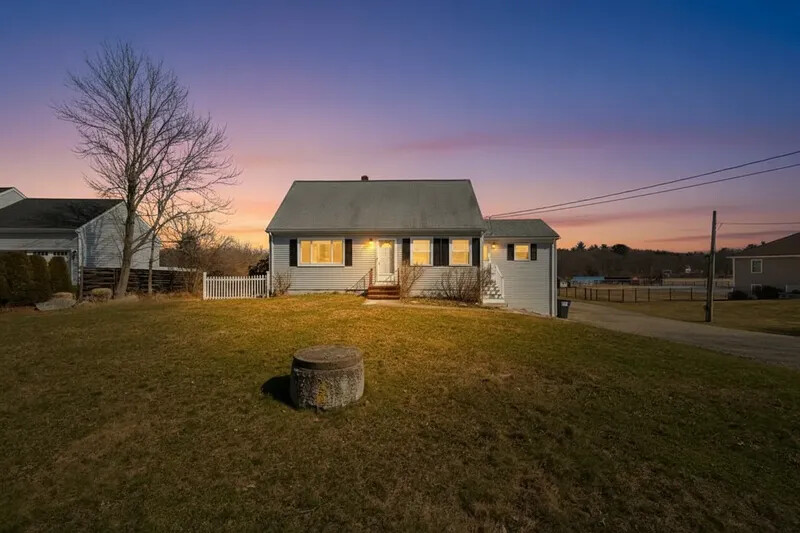
A dusk exterior reads warmer and more lived-in on the neighborhood-led detail page — the strongest hero variant on Homes.com.

Before
After
06

Dining-room lifestyle photo

Dining

Homes.com's lifestyle slant rewards entertaining-friendly dining shots — Edensign stages the table, lighting, and chairs in one pass.

Before
After

Pricing for Homes.com publishers

Per-photo pricing that fits the Homes.com photo cap.

Most agents publishing to Homes.com sit on Professional ($0.77/photo) — enough volume to fill a 30–50 photo set across 6–12 listings a month.

入门版

$1.33/ 张

$20 美元 / 月

180 张 / 年 · 按 年 计费

适合首次尝试虚拟布置的房产经纪人。

专业版

最受欢迎
$0.90/ 张

$45 美元 / 月

600 张 / 年 · 按 年 计费

为持续出图的活跃经纪人与摄影师量身打造。

高级版

$0.78/ 张

$117 美元 / 月

1800 张 / 年 · 按 年 计费

用量1800 张/年
150300500100020005000

面向高用量需求的中介公司和房产团队。

What Homes.com publishers ask before signing up

Yes. Homes.com displays whatever the host MLS feeds it. Each MLS has its own disclosure rules for virtual staging — typically a 'Virtually Staged' label in the photo caption or listing remarks. Edensign output itself is policy-neutral; the disclosure is the agent's responsibility per local MLS rules.

Homes.com leads with the neighborhood, not the listing. The community profile, school ratings, and lifestyle write-up render above the listing carousel — Zillow and Realtor.com put the photo grid first. That changes which photos do the most work: on Homes.com, the hero confirms the home matches a neighborhood the buyer has already committed to.

Homes AI is the conversational search assistant on Homes.com — buyers can ask questions like "3-bed near a great elementary" in 50+ languages and get listing results. The hero photo appears on the AI result card. Bright, well-staged hero photos earn the tap at small result-card sizes; vacant rooms get scrolled past.

For most listings, no — Homes.com ingests from your MLS feed and refreshes within 4–24 hours. For agent-claimed listings on Homes.com Pro, you can also upload and re-order photos directly in the agent dashboard. Edensign output works for both paths.

Homes.com displays up to ~50 photos depending on the MLS feed contract; agent-claimed listings can add more via Homes.com Pro. Edensign per-photo pricing makes a full set affordable — a 40-photo carousel runs about $31 at Professional tier.

Apartments.com and LoopNet are part of the same CoStar Group portfolio but operate separate listing inventories — rentals (Apartments.com) and commercial (LoopNet). Staged residential-sale photos don't auto-cross-list. Edensign exports standard JPGs that work on either platform if you publish there separately.

Most MLSes push updates to Homes.com within 4–24 hours. Edensign's 15-second render time means you can stage a fresh hero on Monday morning and see it live on Homes.com by Tuesday morning at the latest.

Stage for the other listing platforms too.

Pages tailored to each major listing surface and its photo rules.

你的下一个房源
值得更出色的视觉呈现

几秒钟开始虚拟布置。无需信用卡,无需设计经验。

将房源照片拖放到这里

支持 JPG、PNG、WebP、AVIF、HEIC

联系销售

Trademark notice. Edensign is an independent service. Homes.com®, Homes AI®, Apartments.com®, and LoopNet® are registered trademarks of CoStar Group, Inc. or its affiliates. Edensign is not affiliated with, endorsed by, or sponsored by CoStar Group, Inc. All trademarks belong to their respective owners.